
An ordered deck
Arrange your workouts in the order you want to train them, and reorder any time.
The rolling workout plan
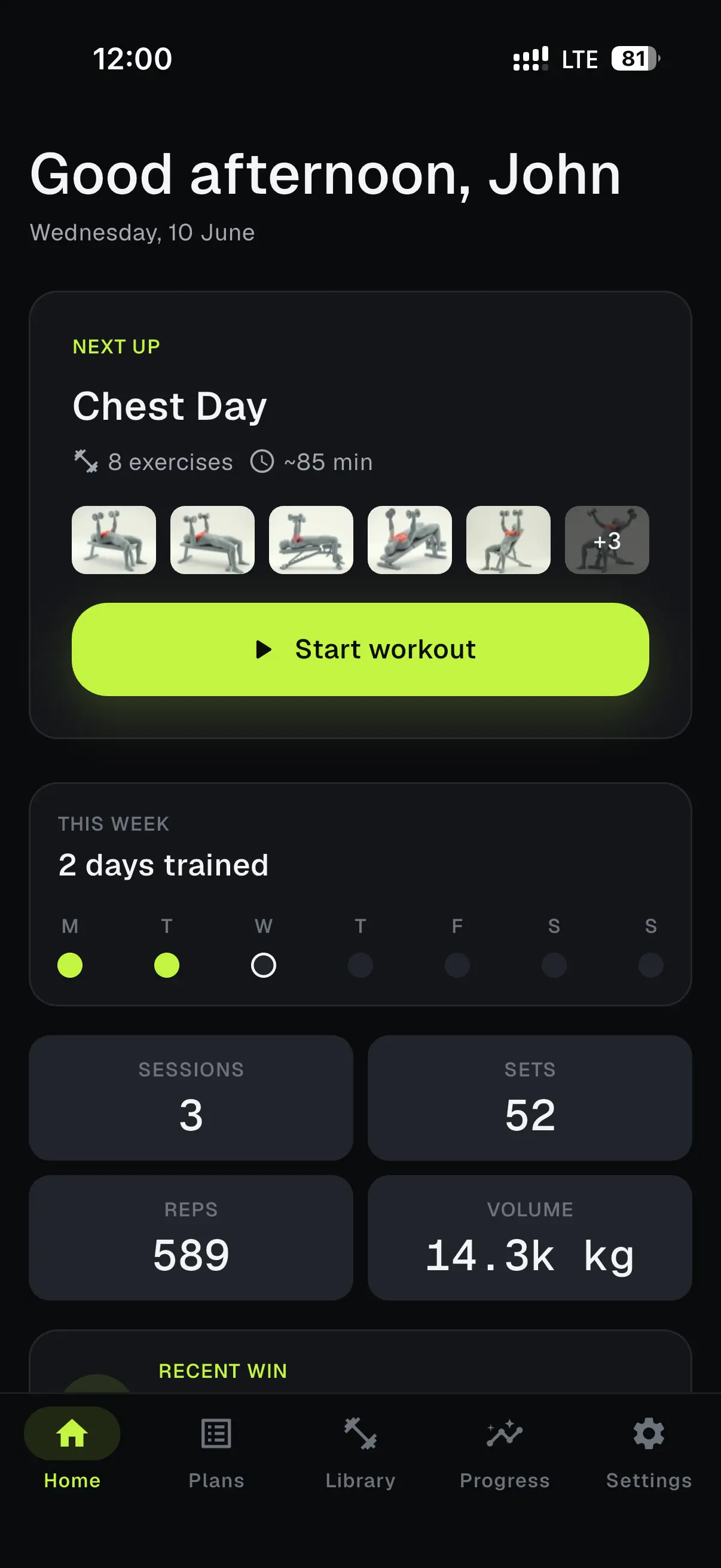
Kudora keeps your workouts in order and moves at your pace. Finish one and the next steps up. Come back after a busy week and you carry on right where you left off.
The rolling plan
A calendar pins each workout to a date, so one busy day puts you behind. Kudora works like a deck. Your plan keeps its order and moves only when you finish a workout. Reminders are a separate choice: pick the weekdays that suit you and each one names whatever is next.
Try it. Complete the next workout, or let a day pass and watch what stays put.
Your plan
Push day
Chest · Shoulders · Triceps
Pull day
Back · Biceps
Leg day
Legs · Glutes
Core and cardio
Core · Cardio
Upper body
Chest · Back · Shoulders
Full body
Functional · Legs
Weekly reminders
Monday reminder: Push day is next.
Push day is next. Use the controls to see how the plan rolls.
Arrange your workouts in the order you want to train them, and reorder any time.
The plan moves up only when you complete the workout in front, so it always reflects real progress.
Pick the weekdays that suit you. Each reminder names whatever is next in line.
During your workout
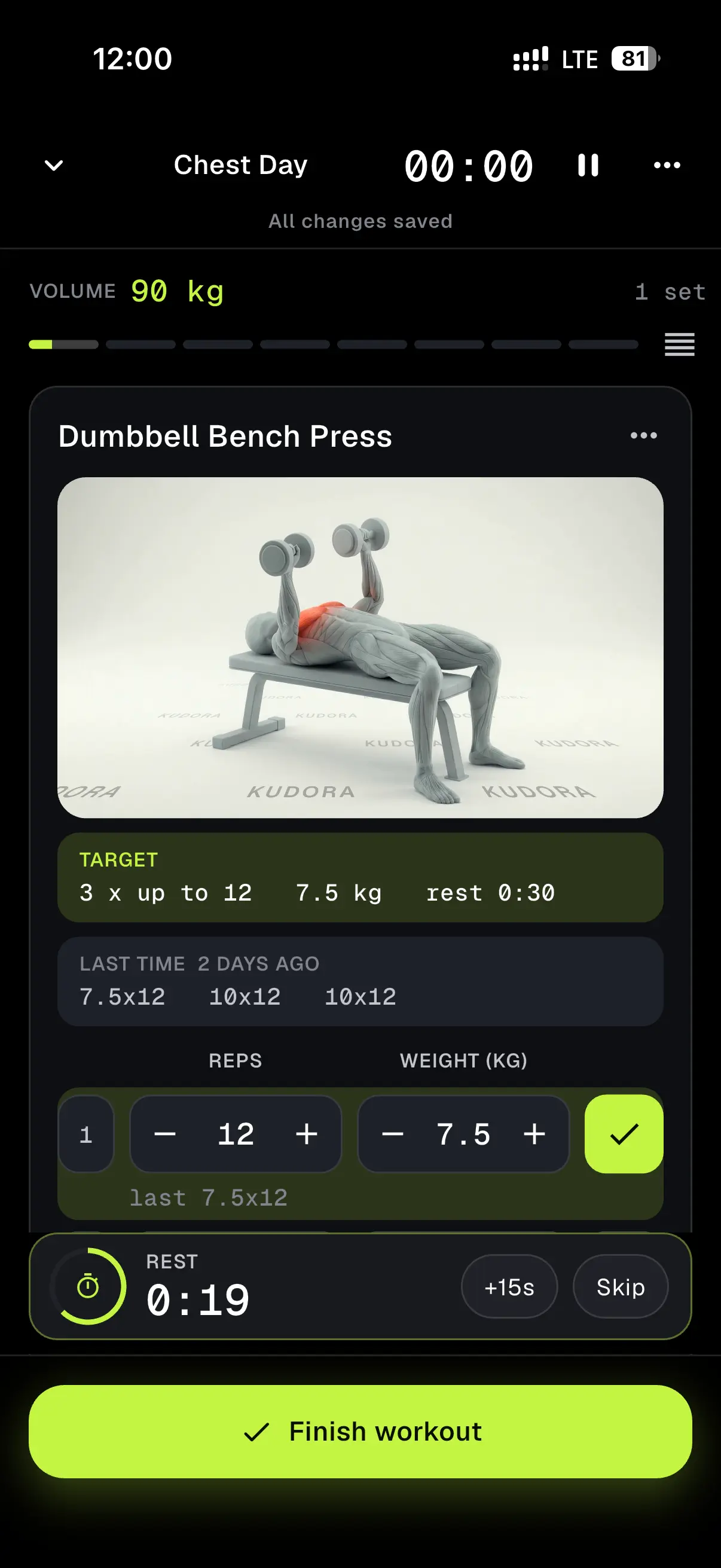
Kudora keeps up with you while you train. Big tappable numbers, a rest timer, and quiet records, all in one calm screen.
Pause and pick up later
Step away in the middle of a workout and return whenever you are ready. Your session waits exactly where you left it.
Fast big-number logging
Large, tappable fields make recording weight and reps quick between sets.
A built-in rest timer
Start a rest countdown with one tap and keep a steady pace between sets. Included free.
Quiet personal records
Kudora spots when you beat a past best and marks it, without breaking your flow.
Notes on any set
Jot how a set felt or a cue to remember for next time, right beside the numbers.
High-contrast Session Mode
A bold, glanceable layout built for reading at arm's length in a busy gym.
Exercise library
Kudora comes with hundreds of exercises, each with a clear looping animation and simple steps. Browse by category, search by name, and save the ones you reach for most.
Every exercise loops as a clean animation, backed by short researched steps and tips in plain English.
Find any exercise by name, or browse the categories to plan your next move.
Keep the exercises you reach for most within easy reach.
Create custom exercises for the movements that are all yours.
Build your way
Pick exercises into a workout, then line your workouts up into a plan. Change the order whenever your training does.
Add exercises from the library, set your target sets and reps, and give it a name.
Stack your workouts into a deck, in the order you want to train them.
Drag a workout up or down whenever your week changes. The rolling plan keeps pace.
Measurements
Log body weight, body-composition readings, and tape measurements. Kudora turns them into simple trends you can read at a glance.
Log body weight, body-composition readings, and tape measurements like chest, waist, and arms.
Every measurement becomes a clean trend, so you can read the direction over weeks and months.
Add a new reading in a couple of taps whenever you measure.
Reports
Kudora reads your logged work back to you: which muscles you train most, how your categories balance, your strength and volume over time, and how steady you stay against the frequency you choose.
Training consistency
Personal records
7
New personal bests, last 8 weeks
Estimated 1RM
92kg
Bench press, last 8 weeks
Weekly volume
15.1k kg
Total load per week
Category breakdown
Reminders
Pick the weekdays you want a reminder. Each one names whatever is next in your plan, so you always know what to train.
Choose your days
Set reminders on the weekdays that fit your routine.
Names what is next
Each reminder tells you exactly which workout is up next in your plan.
Right on your phone
Reminders are scheduled on your device, so they arrive on time.
Pull day is next
Ready when you are. Open Kudora to start your workout.
Remind me on
Pricing
Kudora is free to use, with a Pro plan for deeper reports and unlimited planning. Pick monthly or yearly, whichever suits you.
Free
$0
Everything you need to train with a rolling plan.
Pro
Most popular$2.99/month
Deeper insight and unlimited room to plan.
Subscriptions are billed through your app store, and your local price is shown at checkout. Cancel any time.
FAQ
Your plan is a deck of workouts rather than a calendar. It moves forward only when you finish a workout, so the next session is always whatever you have not done yet.
Your plan waits for you. The next workout stays next until you complete it, then everything moves up by one. You always carry on from where you left off.
Yes. Pick any weekdays you like, and each reminder names whatever is next in your plan.
Hundreds, spanning every major muscle group. Each one has a clear looping animation and short steps in plain English.
Yes. Add exercises into a workout, stack workouts into a plan, and reorder either one whenever you like.
Yes. The core of Kudora is free, including the rolling scheduler, the rest timer, reminders, live logging, and measurements. Pro adds the full muscle heat map, long-term history, and unlimited custom plans.
You can manage or cancel your subscription any time in your app store account, and you keep Pro until the end of the period you paid for.
Download Kudora and build a plan that moves at your pace. Free to start, with Pro when you want more.